
Your admissions desk never loses track of a parent
Prospective-parent inquiries land in one queue, campus tours become booked appointments, and your admissions funnel is measured stage by stage. If you want, WhatsApp, Instagram, Telegram and web chat replies pass principal or administration approval before they reach a parent: on sensitive topics only, or on every reply.
14 days free · No card · Three-step setup
Recommended on the Growth plan and above.See pricing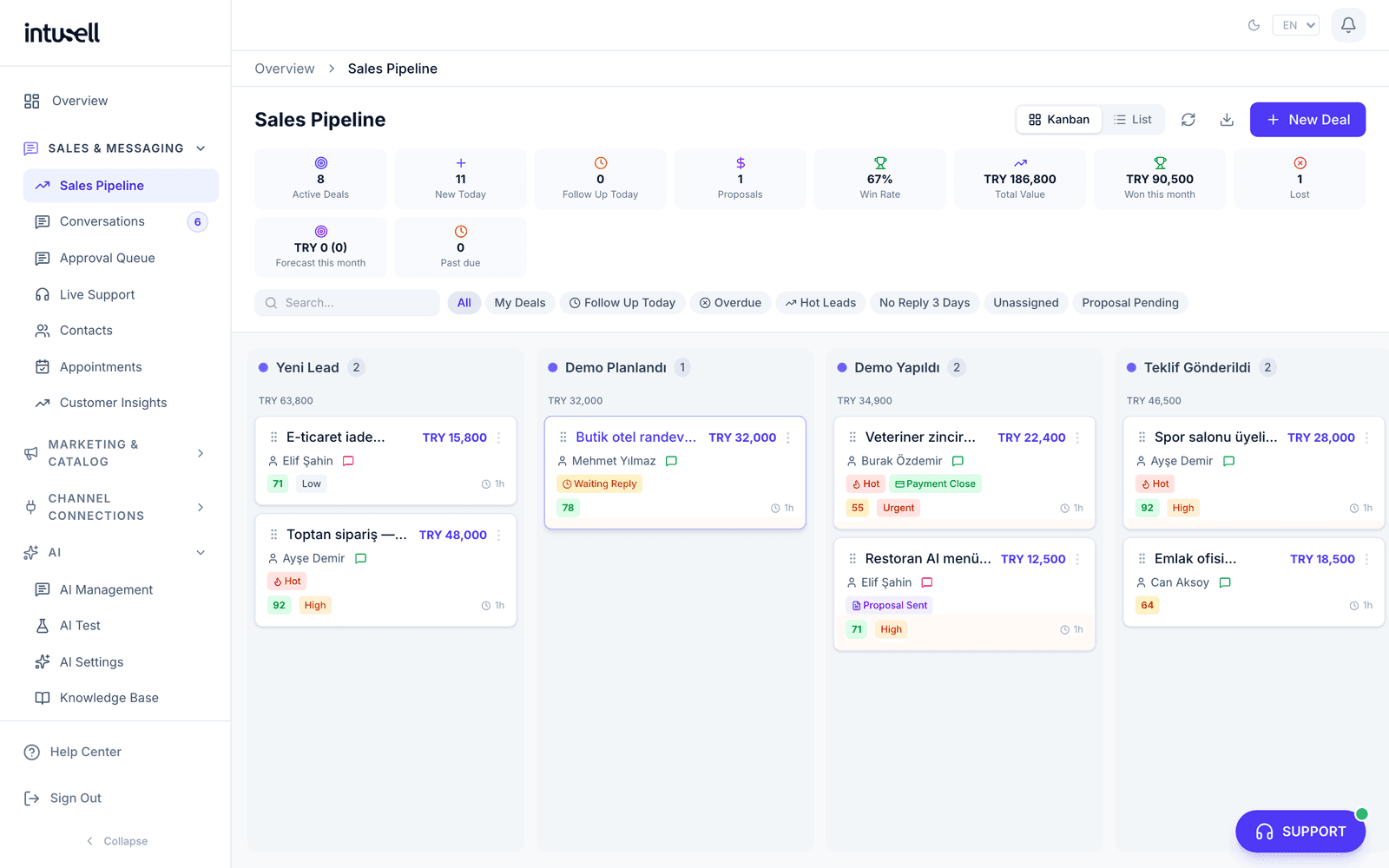
Capabilities built for your industry
Not a generic chatbot; AI configured around your workflow.
Admissions funnel
In private schools and nurseries, an eight-stage tour-based School Admissions Funnel from inquiry to enrollment: first contact, tour booking, tour, offer, decision. Tutoring centers, language schools and general course providers get the seven-stage Education / Course Sales Flow, where the trial lesson is one stage of its own. Every prospect records its source and referrer, and every closure a standard loss reason.
One queue, a fast first reply
Inquiries from WhatsApp, Instagram and your web form arrive in one queue; the AI drafts the first reply as the message arrives on WhatsApp and the web, usually within 1-2 minutes on Instagram; if you turned on principal approval, it goes out once your staff approve it. Your first-response time is measured.
Tours & group sessions
The campus tour appointment type is provisioned at setup; the AI offers free times, takes the booking, asks the parent to confirm a day ahead and reminds again 2 hours before. Once you define a fixed-hour intro session or an open day with capacity in the panel, the AI also shows remaining seats and enrols into that session.
Segmented parent updates
Announcements and newsletters are targeted by grade-level tag and delivered as one-to-one messages; parents never see each other's details.
Optional principal approval and your voice
You choose principal approval at setup: no approval, sensitive topics only, or every reply. You can change it at any time. With every reply selected, WhatsApp, Instagram, Telegram and web chat replies wait as drafts and go out once your staff approve them; with sensitive topics only selected, replies about a discount or scholarship request and about the child’s health wait. With no approval, the AI replies to parents on its own. Concrete facts (fees, address, opening hours, enrollment conditions) come only from your own knowledge base; when the AI cannot find them it does not invent them, it hands off to your staff.
Consent management
Permissions are recorded per person, channel and purpose; when a parent replies STOP, marketing messages halt immediately while service updates continue.
Education isn’t one kind of institution. The setup doesn’t pretend otherwise
You pick your institution type during setup; the starter knowledge entries, objection replies, fields collected in chat and the admissions flow all follow from it.
- Yeni Aday
- İlk Temas
- Tur Randevusu
- Tur Yapıldı
- Teklif Sunuldu
- Karar Aşaması
- Kesin Kayıt
- Kaybedildi
The card doesn’t wait to be dragged: after every message from WhatsApp or Instagram the conversation is classified and the card moves to the matching stage. Every move is logged with “auto sync” as its source. Once a card reaches the won or lost end, the AI won’t pull it back.
There is a fifth option: “Course / Education Center (General)”. It has no starter knowledge or objection set of its own: it uses the broad Education & Courses defaults and comes with the Education / Course Sales Flow.
A preschool parent asks about nap time, a middle-school parent about the LGS exam
Every grade level brings its own questions. Write the topics below into your knowledge base and the AI answers parents from your text; on a topic you have not written, it states no school-specific durations, numbers or rules.
Preschool and nursery
- What parents ask
- Settling-in period, age groups, children per teacher, meals, nap time and toilet training.
- First visit
- A nursery setup comes with an introductory visit appointment type, a school setup with an introductory school tour. The AI offers a free time and books the visit itself.
- Saved to the contact card
- The child’s age group (for example 4-5) if the parent mentioned it in chat. The child’s name and birth year are never saved from chat.
Primary and middle school
- What parents ask
- Primary: school readiness, foreign-language hours, supervised study and the school bus. Middle school: LGS exam preparation, guidance counseling, clubs and foreign-language level.
- First visit
- The AI offers free school tour times and books the appointment itself; it asks the parent to confirm a day ahead and reminds again 2 hours before.
- Saved to the contact card
- The grade level and target grade, if they came up in chat. No separate form for the parent: the information comes from the conversation itself.
Open day and one-to-one tours side by side
Once you add an open day date in the panel, the AI offers it next to one-to-one tour times and books it without exceeding the capacity. Without a date, it does not offer an open day.
Ready campaign drafts for the season
Schools and nurseries get drafts for an early enrollment announcement, an open day invitation, a re-enrollment reminder and a sibling and parent referral. The texts carry no fee, discount or urgency language. You fill in the dates; while a placeholder is empty the campaign does not go out, and promotional messages reach only parents who gave consent.
On the parent’s side, control stays with you.
The questions people ask most about a system that talks to prospective parents, and what the product actually answers.
If you want, the principal or administration approves a reply before it reaches a parent
Principal approval is optional: you pick one of the options below at setup and can change it at any time under AI Settings › How it works. A draft you approve or edit goes to the parent exactly as it stands.
- No approvalDefault
The AI replies to parents on its own. The fixed lines below apply in this option too.
- Sensitive topics only
Replies about a discount or scholarship request, or about the child’s health, medication or allergy, wait for your approval. The parent is told you will write in the same chat once it is approved. The AI answers everything else.
- Every reply
Choose this and the account opens in Full approval: on WhatsApp, Instagram DM, Telegram and web chat, the AI’s draft goes out once your staff approve it.
On web chat the parent sees that the message was received; the approved reply appears in the chat window if it is still open.
Fixed lines on fees, enrollment and child safety
They apply whichever option you choose. If a fee in a reply is not in your knowledge base, catalog or instructions, that sentence is removed and replaced with “I can’t confirm the current fee from here.” Without a real booking behind it, the AI never says “I have enrolled you” or “I have reserved your place”. A report of bullying, injury or a missing child is handed to your team; for a missing child, an ongoing injury or abuse, the parent is first told to call 112, and the alert reaches you even in quiet hours.
Parents manage their own permissions
You send the parent a dedicated link; without logging in they see which channel and purpose they consented to, and can grant or withdraw marketing consent. The page masks their identifying details. The link is valid for 30 days, and issuing a new one immediately invalidates the old one.
Capacity holds even when bookings land at the same moment
When you define an intro session or an open day with a capacity, the capacity check and the booking itself happen in a single database transaction while the session row is locked. The last seat cannot be taken twice, even by simultaneous requests; the later parent is told it is full. Until you define a session with capacity, the AI won’t offer one.
Your first-response time is measured, not estimated
The clock starts at the parent’s first message and stops at the first reply sent after it, not when the conversation record was opened. A draft waiting in the approval queue does not count as answered; the clock stops when your staff sends it. Delivery and read receipts do not count as a reply. With no data to measure, the panel shows an empty value, not zero.

Frequently asked questions
What institutions ask first, short and clear.
Does inTusell replace our school management system?+
Does the AI talk to parents directly, or do we stay in control?+
Will the AI promise fees or discounts?+
How is student and parent data protected?+
Does it suit nurseries, tutoring centers and language schools too?+
How long is setup and which channels connect?+
Does the AI send the fee quote?+
Let AI answer this week’s messages.
Three-step setup. No credit card.